BUSINESS ORCHESTRATION PLATFORM

Orchestrate
your business

Connect people, processes, projects, data, existing systems and AI — working together on one platform. We design how businesses work, and build the platform to orchestrate it.

Deployed on-premise · Your data on your own servers · GDPR/KVKK friendly
4work paradigms: process, work, ticket, project
0 codeneeded to design processes — all on screen
1 dayto set up: wizard + bulk CSV import
180+automated tests guarding the engine
PLATFORM

Makes every instrument in your business
work in harmony

A business is home to many systems, processes and teams — each good at its own job, but working together in harmony doesn't happen by itself. BusinessChord governs when, in what order, by which rule, with which authority and which data people, processes and the systems you already use work together: What should happen next? Who should act? What awaits approval? What is delayed? And thanks to its modern API it can integrate with every product in your business — it doesn't replace your existing systems; it makes them part of the same orchestra.

Processes without code

Process behavior is data: stages, approvals, forms and rules are defined on screen. Algorithms like "escalate approval above this limit" are built into the engine — you simply choose.

Version safety

Changing a process creates a new version; open cases keep flowing on their own version. "The rule changed and broke work in flight" is architecturally impossible.

Person ≠ seat

Authority and approval chains attach to positions, not people. When someone leaves and another arrives, processes keep working — nothing to update by hand.

One "Pending" list

Cases awaiting your approval, work on your plate, tickets assigned to you — one badge, one screen. Who holds what is always clear.

Automation + dual-channel alerts

"Remind 3 days before the deadline", "escalate tickets unassigned for 24 hours" — set the rule, the engine enforces it. Notifications arrive in-app and by email.

Enterprise permission model

Role and permission based, department scoped, fully audited. Sensitive fields like salary are guarded by separate permissions — no "managers see everything" assumption.
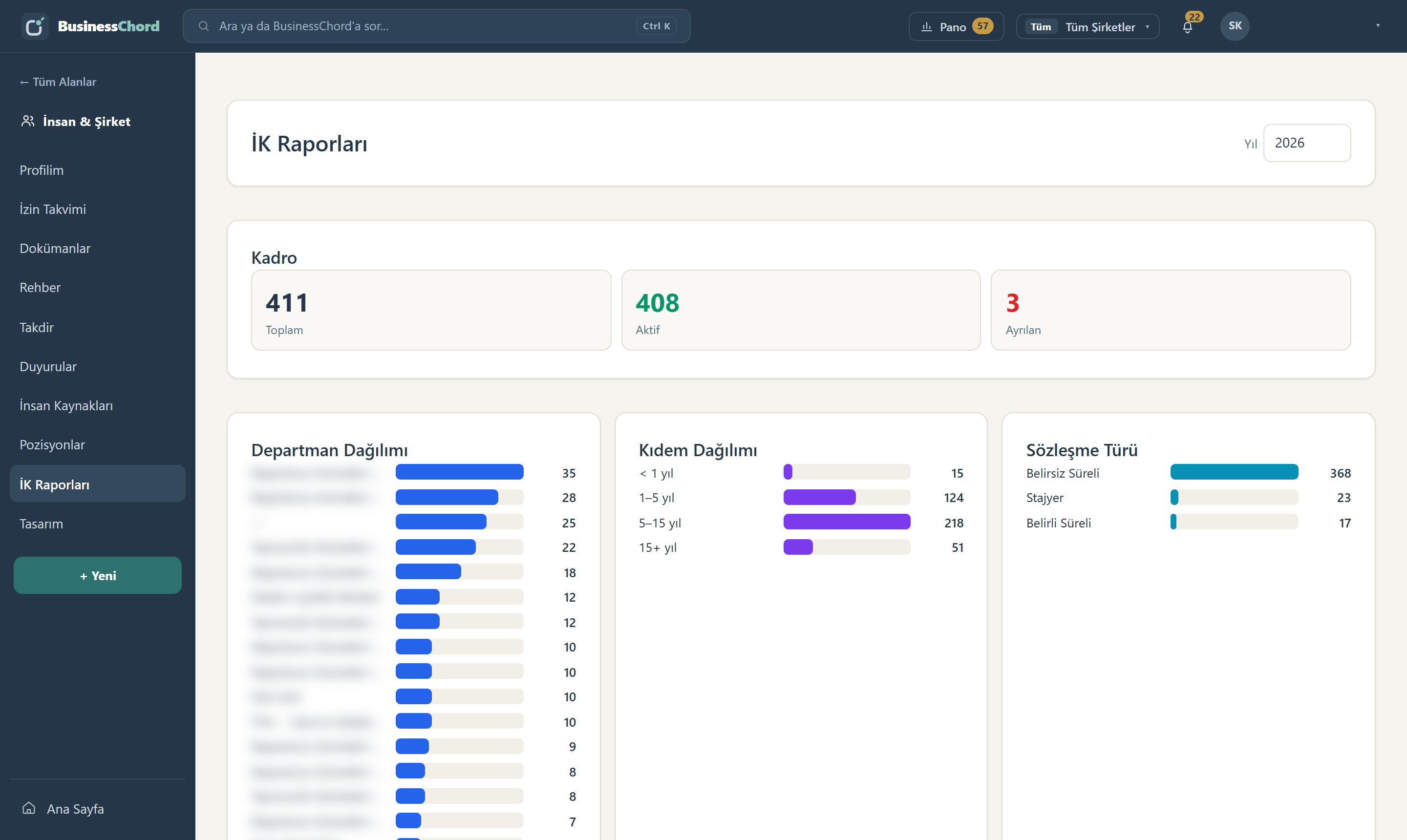
HR Reports screen: headcount, department distribution, seniority distribution and contract type breakdown; unit names blurred.
BusinessChord People. Headcount, department, seniority and contract type in one view. These numbers do not come from a separately maintained reporting table — they come from the employee records themselves, so the day someone joins or leaves, the figure is already right.
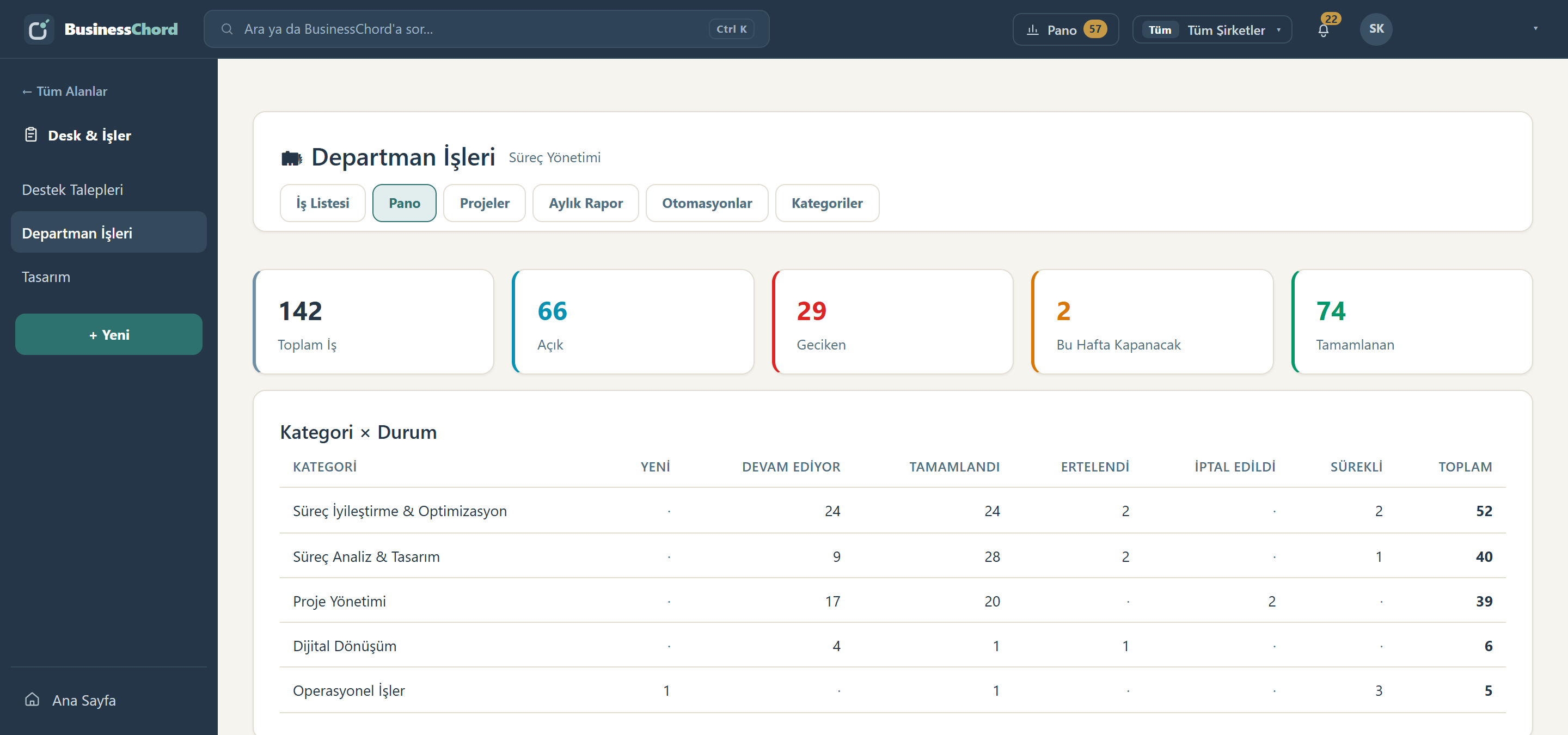
Department Work board: total, open and overdue counters plus a category by status breakdown.
Department work and projects. A department's whole workload on one board: total, open, overdue, closing this week. The breakdown underneath splits it by category and status. Nobody updates the “overdue” count by hand — it is derived from the due date.
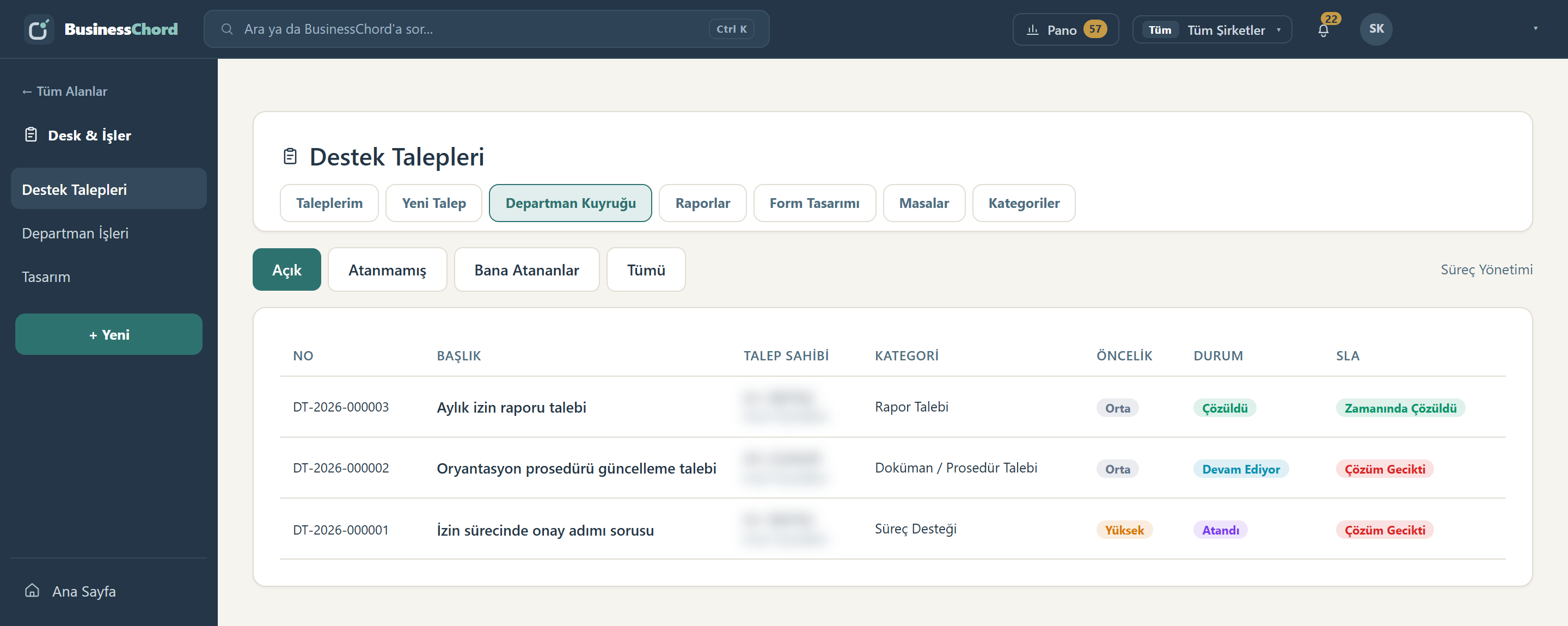
Support ticket department queue: ticket number, category, priority, status and SLA columns; the requester column is blurred.
Support tickets. Cross-department helpdesk: every ticket carries its number, requester, category, priority and SLA state. The “resolution overdue” label is not a user's judgement call; it follows from the target time defined for that category.
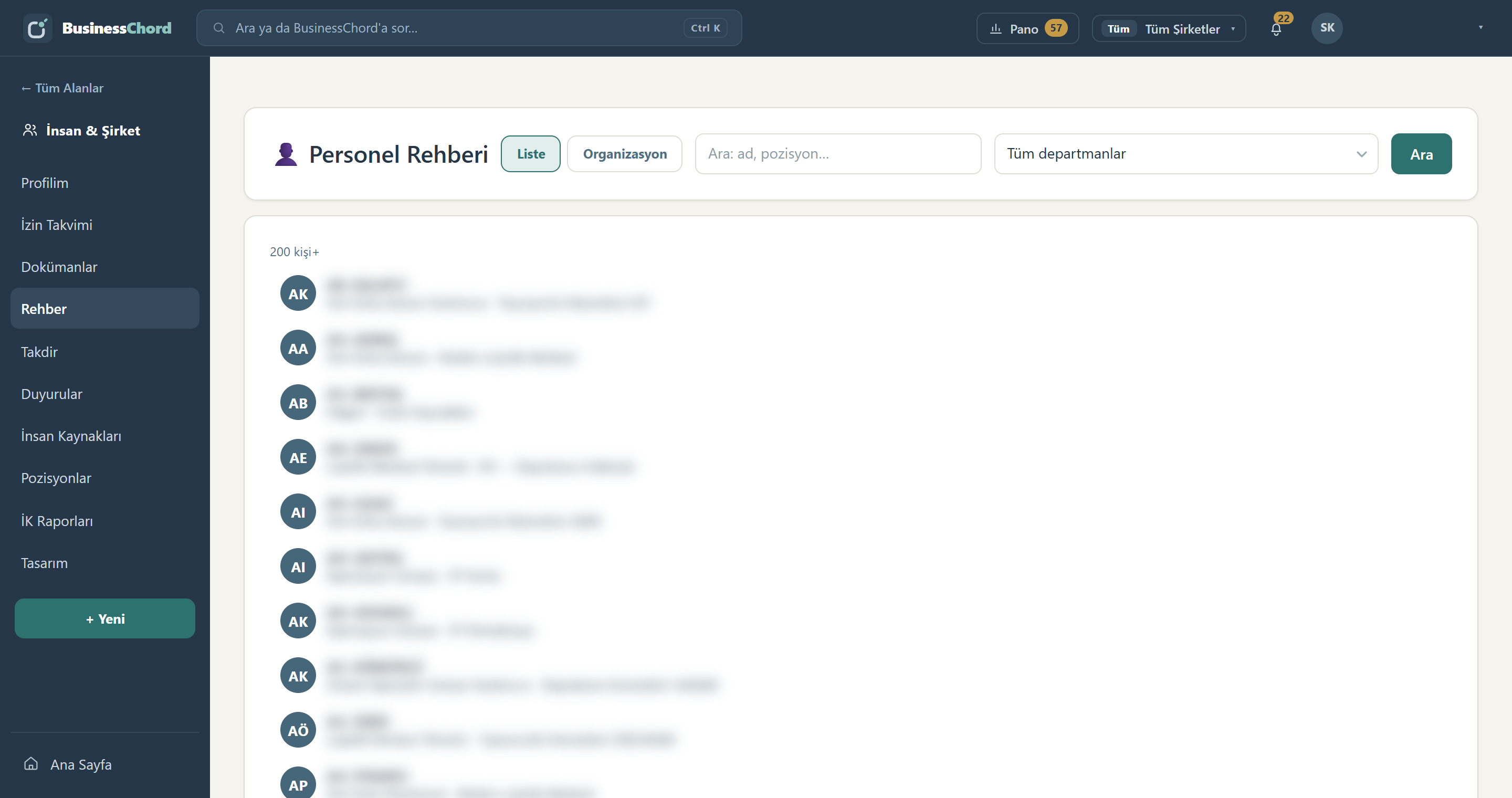
Employee directory: a searchable list of people; names, positions and department lines are blurred.
Corporate portal. The employee directory, announcements, document library and recognition wall run on the same identity, the same organization and the same permission model. There is no separate intranet product to install and keep in sync.

These screenshots come from a running installation. Employee names, unit names and job titles are blurred; the figures and statuses are untouched.

WHY BusinessChord

A chord is different notes
joined in the right relationship

BusinessChord doesn't make the parts of a business the same. It makes them work together — in the right relationship, order, context and timing. The five letters in our name are the shared philosophy of both the platform and the consulting practice.

C

Connection

Meaningful connections between people, processes, roles, data, projects, systems and AI. The connection it builds is wider than technical integration; it covers organizational, permission, decision and task relationships.

H

Harmony

Different functions work together without being forced into one type: without conflict, complementing each other, toward a shared goal.

O

Orchestration

The right action at the right time, in the right order, with the right authority: workflow + rules + approvals + integrations + automation + AI.

R

Rhythm

Every business has a rhythm: a request arrives, a decision is made, work gets done, results are measured, a new request arrives. That cycle becomes visible, measurable and manageable.

D

Dynamics

Businesses change constantly: people, roles, processes and priorities. The structure adapts without losing continuity — evolving without descending into chaos.

Your existing systems keep the records

"What happened?" — transactions, records, balances. Necessary, but it doesn't run the work on its own.

BusinessChord orchestrates how the business works

"What should happen next? Who should act? Which rule applies? What needs approval? Which system should respond? What should AI do?"

Different parts, one coordinated system
APPROACH

Work doesn't fit one mold.
BusinessChord speaks four at once

Real companies run four kinds of work — most software forces you into one. BusinessChord keeps all four distinct yet connected on one platform: a ticket becomes a work item, work rolls up to a project, a process updates the record.

Process Case

Flow work. Purchasing, advances, leave, onboarding… Staged, approved, versioned. Who approves and which document is required — all defined.

Department Work

Record work. Long-running department workload: categorized, deadlined, dashboarded. The system computes deadline status.

Support Ticket

Queue work. Cross-department helpdesk: SLA targets, a single timeline, attachments. If a ticket grows, one click turns it into work.

Project

Handover work. Multi-department projects: unit-by-unit handover chains, accept/reject flow, live progress.

MODULES

Different instruments
of one orchestrated business

The modules are different instruments of one orchestrated business. All of them run on the same identity, the same organization, the same permission model and the same process engine.

BusinessChord Process · IN EVERY PLAN

Process engine + visual designer: workflow, forms, approvals, business rules, limits, versioning, printable forms and automation · unified Pending · permissions · setup wizard and bulk CSV import · in-app guides.

BusinessChord People · IN THE PILOT

Organization, positions and authority relationships · employee card (HR file, dependents, qualifications, protected salary field) · asset management · onboarding and offboarding processes — the process completes and the record opens/closes itself · self-service "My File" · leave calendar and balance ledger · company portal with announcements, document library, people directory and calendar.

BusinessChord Desk & Projects

Support tickets: department queue, SLA, internal notes, attachments · department work registry with your own category taxonomy · dashboards: category×status, overdue, upcoming, workload per person · work↔ticket bridge · multi-department projects and handover chains · automation rules + email channel.

BusinessChord CRM · IN THE PILOT

Customer, opportunity, sales and interaction processes · sales steps orchestrated by the same engine: quote approvals, the flow toward a contract, a customer request becoming a process · customer history on a single timeline.

BusinessChord Insight

KPIs, dashboards, process analytics and management visibility — the answer to "how well is it working?". Deadline and SLA status is computed automatically; the ledger is the truth, summaries exist for speed.

BusinessChord AI · OPTIONAL

Natural-language questions, file summaries, filling forms from documents, request routing and suggestions while designing processes. Every suggestion is previewed — nothing changes until you Approve / Edit / Cancel, and you choose which processes' content may go to the AI.

New instruments on the roadmap: BusinessChord Contracts (contract lifecycle) and BusinessChord Procurement (need-to-order purchasing orchestration).

BusinessChord CONSULTING

We don't just digitize processes —
we design how the business works

Software only accelerates a badly designed way of working. That is why BusinessChord is two structures in one: Consulting, which designs the company's Business Operating Model, and the Platform, which runs that model in daily operations. Both share the same philosophy.

Operating Model Design

Designing how the business works: functions, processes, roles, authorities and decision mechanisms.

Process Excellence

Process discovery, process architecture, standardization, simplification, SOP and policy design.

Operational Excellence

OPEX, Lean, DMAIC, root-cause analysis, efficiency, waste reduction and continuous improvement.

Digital Process Design

Building the right business model and working logic before a process is ever moved into software.

Performance & Insight

KPI design, process performance, management reporting and decision-support structures.

AI & Digital Transformation

Applying AI to processes, operations and decision mechanisms — starting from the right place.

Design

Consulting designs how the business should work: processes, roles, rules, decision points.

Orchestrate

The Platform runs the designed model in daily operations: flows, approvals, automation.

Measure

Insight measures how well it works: KPIs, process analytics, delay and workload visibility.

Improve

Measurement feeds the next design — and the cycle starts again. A process is drawn again as the business changes; it evolves with it.

SETUP

Not months of implementation:
one day

BusinessChord doesn't require an army of consultants. Setup is part of the product — three steps and you're live, with everything in your own hands afterwards.

Open with the wizard

An empty system is set up with three questions: company name, first department, system administrator. You are inside with full rights in minutes.

Staff via CSV

Fill the ready-made template: departments, positions, titles, people and manager links in one file — preview first, then apply.

Draw your processes

Define your first process in the visual designer, or start instantly with built-ins (leave, purchasing, on/offboarding). The in-app guide stays with you at every step.

PRICING

A simple model: pay per user,
unlimited processes

There are two user classes: a Full User runs processes, resolves work and tickets, and manages. A Portal User uses self-service screens, opens tickets and enjoys the intranet — every full user includes 3 portal users free. Processes, forms and automations are unlimited.

PlanFull user / monthScope
StarterTeams starting with one department or a pilot $12minimum 25 full users All of Process, plus one additional instrument (People, Desk & Projects or CRM). Three portal users per full user. Standard support.
EnterpriseOrganizations building a company-wide digital workplace $10minimum 100 full users Process and every instrument, unlimited portal users, on-premise deployment, the "Out of the Box" setup package, priority support SLA.
Enterprise+Multi-company structures, specific requirements Customscoped to your requirements Everything in Enterprise, plus holding / multi-company structure, enterprise system and directory integrations (SSO included), per-day process consulting, dedicated support and roadmap access.
Request a quote Billed annually. No limit on processes, forms or automations.

"Out-of-the-Box" setup

Fixed-price setup package: environment install, staff import via wizard + CSV, co-designing your first 3 processes, admin training. The industry charges 15–20% of first-year value; BusinessChord ~10%.

Process consulting

Per-day when needed: process analysis and design, data migration, custom reports. Optional; your own team can do it with the designer and guides.

Support options

Standard support is included. Priority SLA (target response times, release priority) adds 10–15% of the annual fee. Updates are part of the subscription.

Prices are indicative for annual billing; the final quote depends on user count, module selection and setup scope. For organizations preferring a perpetual license, a license + 20%/year maintenance model is also available.

ABOUT US

Born in the field,
grown into a product

BusinessChord was born inside a real operation. In a logistics organization with hundreds of users, the entire daily workflow — from purchasing to leave, onboarding to support tickets — was taken out of spreadsheets, email threads and disconnected tools and orchestrated on a single platform.

That is why every screen in BusinessChord answers a lived need: the leave ledger never loses a day, the handover chain ends the "who has this?" question, and the setup wizard gets you running without waiting for consultants. We use the product ourselves every day — the toughest test there is.

Strategy in code, choice in metadata

Algorithms live in the engine; you choose which strategy runs with which parameters. A new process = new configuration.

Records live with the process

Processes touch records: onboarding completes and the employee card opens; offboarding completes and it closes. Data keeps itself current.

Auditability by default

Every action leaves a trace: who, when, and why. The ledger is the truth; summaries exist for speed.

Call us as little as possible

From setup to categories, process design to permissions — everything on screen, with your own team. Consulting is optional.

FAQ

Common questions

Does it replace our existing systems?

No. The systems you use keep managing your transactions and records. BusinessChord orchestrates when, in what order, and by which rule and authority these instruments and your people work together: "What should happen next, and who should act?" It replaces nothing; it can integrate with every product in your business and makes them all part of the same harmony.

Where is our data stored? Is it compliant?

BusinessChord is deployed on-premise: the database and files stay on your servers, inside your network. That is the simplest ground for GDPR/KVKK obligations. AI features are optional: if you turn them on, you decide, process by process, whether its content may be sent to the model; for a closed process the system never sends its content to the model; case summaries and fill-from-document are switched off there. The whole platform works without AI switched on. A cloud option is on our roadmap for organizations that request it.

Does setup really take one day?

Yes — for the technical install and staff import. The wizard opens the system with three questions; the CSV template loads your organization and people in one file (preview first, then apply). Enriching your processes is ongoing work — with the built-in processes you are productive on day one.

Who designs our processes? Do we need developers?

No. The visual designer defines stages, approval chains, forms and rules on screen. The in-app Process Design Guide explains every concept with examples. If you like, we co-design your first processes in the "Out-of-the-Box" package.

Does it integrate with our existing systems?

Yes — BusinessChord is built on a modern API and can integrate with every product in your business; enterprise system and directory integrations (including SSO) are scoped under Enterprise. It also runs perfectly standalone — there are no prerequisites to start independent.

What do we pay for? Does the price grow with process count?

No. Processes, forms and automations are unlimited — you pay only per full user. Employees who open tickets and use self-service are portal users and largely free; nothing in the pricing stops the system from reaching the whole company.

Are product updates included?

Yes. The annual subscription covers version updates, fixes and standard support. For organizations on the perpetual license model, updates come with the annual maintenance fee.

Start orchestrating your business

Fill in the form; see BusinessChord on your own scenarios in a 30-minute demo. We reply the same day.

Prefer to write directly? Send an email

Demo / Quote Request

Pressing Send opens your request as a ready-made email — deliver it in one click.